Ten zones. Infinite possibilities. How Adams turned tonal control into an art form and how you can apply it today.
If you’ve ever seen an Ansel Adams photograph, you know they don’t just look like “black and white photos.” They feel deep. The blacks are like ink, and the whites look like they’re glowing.
He achieved this using something called the Zone System. Most people think it’s complicated, but his “ghost” is here to tell you it’s actually just a simple scale from 0 to 10.
What is the Zone System?
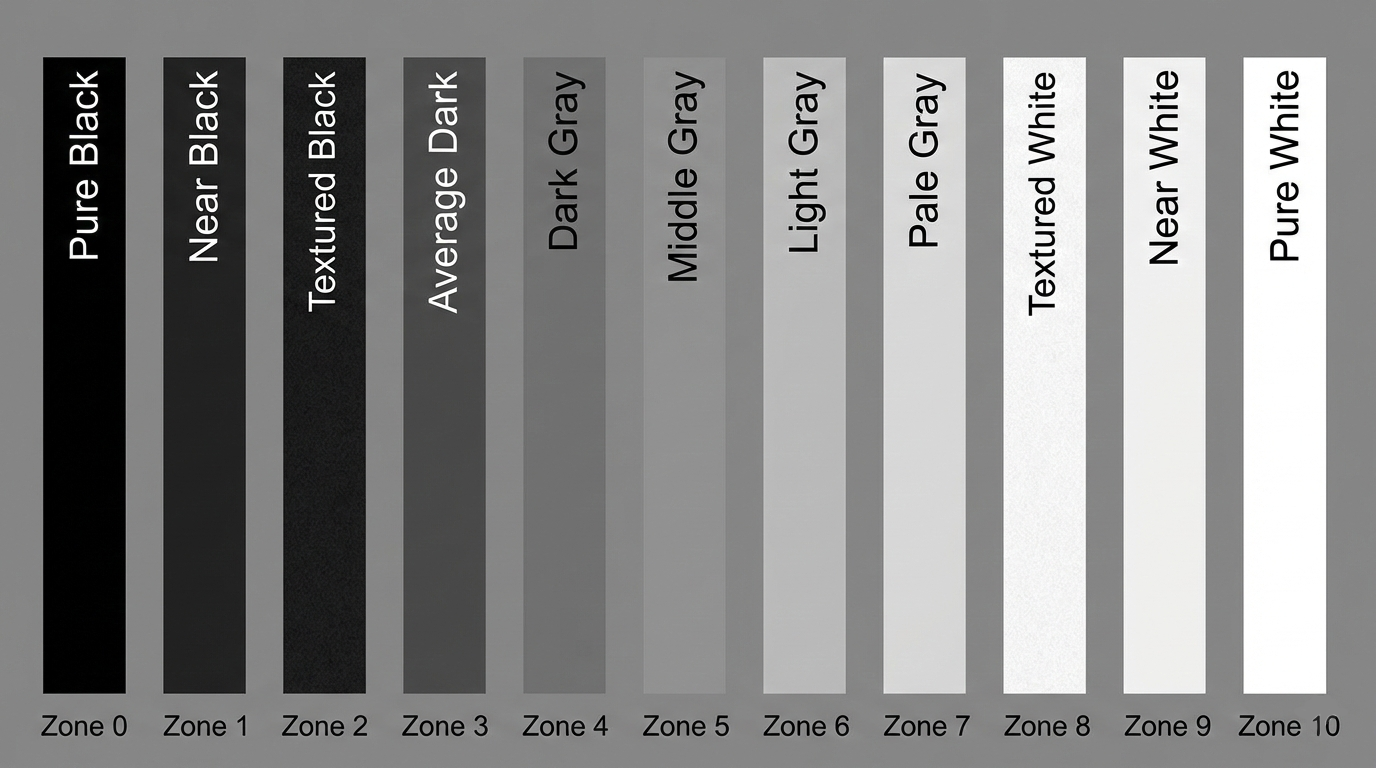
Think of the Zone System as a piano keyboard with only 11 keys.
Zone 0: Pure, “dead” black. No detail at all (like the inside of a dark cave).
Zone 5: The “Middle.” This is “18% Gray”—the color of a weathered sidewalk or a gray cat.
Zone 10: Pure, “blinding” white. No detail (like looking directly at a lightbulb).
The goal of a great black and white landscape isn’t just to “take a picture.” It’s to make sure you have “music” playing across the whole keyboard.
How to Use It
Your camera is actually kind of “dumb.” Its brain wants everything in the world to be Zone 5 (Middle Gray). If you point it at a pile of white snow, it will try to turn it gray. If you point it at a black dog, it will try to turn it gray.
To use the Zone System, you have to take control:
Identify your “Anchor”: Look at your scene. Where is the darkest part where you still want to see texture (Zone 2)? Where is the brightest part where you still want to see detail (Zone 8)?
The Squint: Squint your eyes at the landscape. This helps you ignore the “things” and see only the “shades.”
Adjust your Exposure: If you want the white clouds to look brilliant and detailed (Zone 8), you might need to “overexpose” a little (+1 or +2 on your exposure compensation) so the camera doesn’t turn them into muddy gray. If you want the shadows of the rocks to be deep and moody (Zone 3), you might need to “underexpose” a bit.
Why Should You Care?
In color photography, the colors do the heavy lifting. In black and white, contrast is your only engine.
If your photo only uses Zones 4, 5, and 6, it will look “muddy” or “flat.” By consciously placing your blacks in Zone 1and your highlights in Zone 9, you create “dynamic range.” This is what makes a landscape “pop” off the screen and look like a piece of art rather than a gray photocopy.